


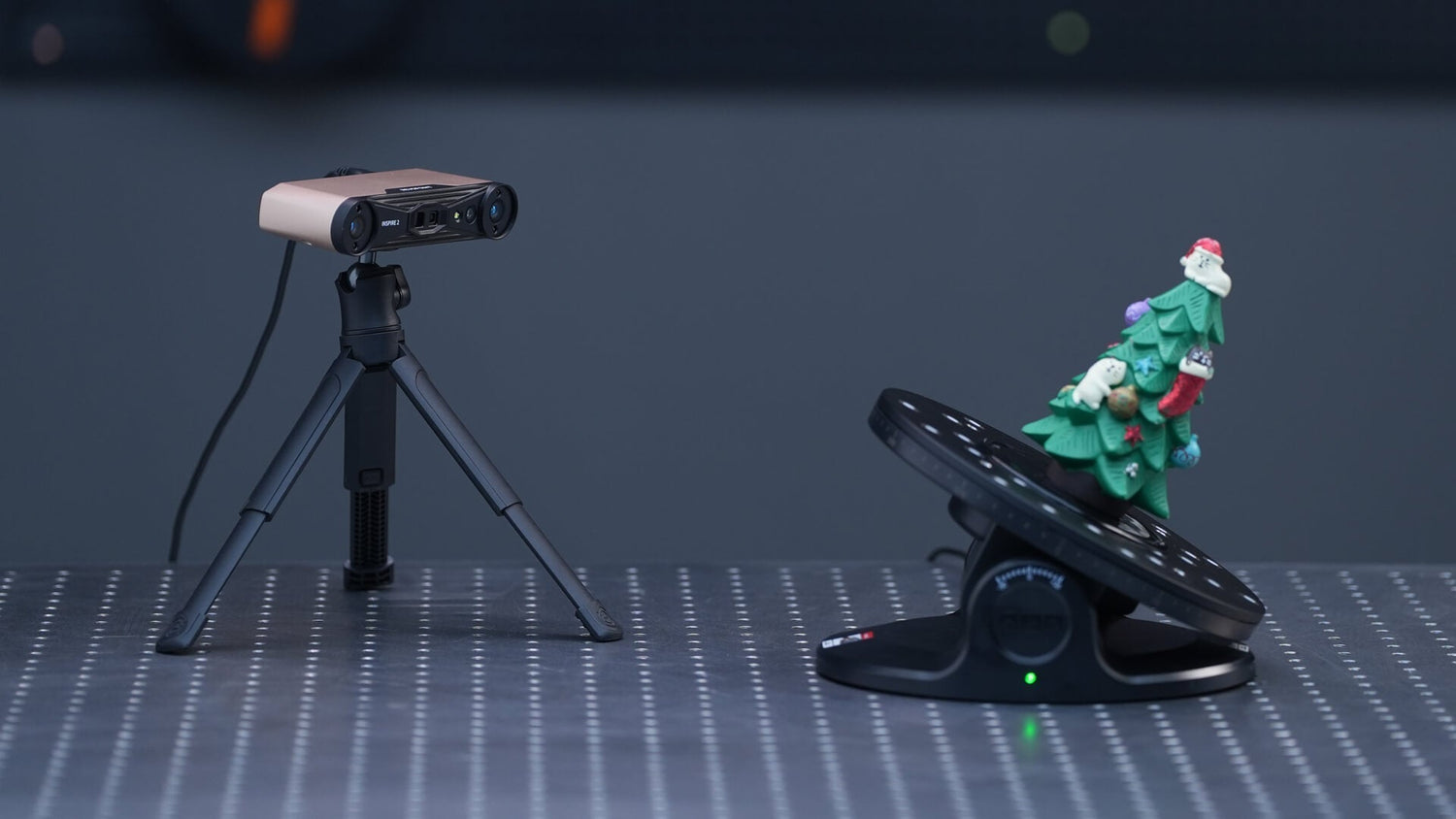
A turntable can make 3D scanning far more consistent, but only when it fits the job properly. If it is too small, too light-duty, or not smooth enough in rotation, it can create the same issues users are trying to avoid: lost tracking, incomplete surfaces, unstable alignment, and more cleanup after scanning.
When choosing a turntable, the main factors are size, load capacity, rotation smoothness, speed control, and whether your workflow actually benefits from tilt. These details have a direct effect on scan quality, especially when you are working with handheld 3D scanners or small-to-medium object capture.
Why the turntable matters in real scanning workflows
A turntable keeps motion controlled and repeatable. Instead of manually rotating the object and introducing small shifts, the object moves on a predictable path. That helps the scanner capture more consistent data and often reduces alignment issues.
This is particularly useful when scanning parts for reverse engineering, objects for 3D printing, or products with multiple sides that need full coverage. A stable platform also helps maintain a more consistent working distance between the scanner and the object, which can improve detail capture.
For many users, the biggest advantage is not just convenience. It is cleaner scan data from the start.
Choose the platform size around the object
The first step is choosing the right diameter. The turntable should be noticeably larger than the object’s base, not just equal to it. If the fit is too tight, the object may overhang, wobble, or become harder to scan from lower angles.
A useful general guide is:
· Small objects: around 20 to 30 cm
· Medium objects: around 40 to 60 cm
· Larger objects: large or custom turntables
This is one reason compact turntables suit jewelry, models, small parts, and crafted items, while helmets, appliances, sculptures, or larger components often need wider platforms.
Load capacity affects stability
Load rating is just as important as size. Even if the object fits physically, the turntable still needs to rotate smoothly under its real working weight. If the platform is close to its limit, scanning can become less stable.

A good rule is to leave safety margin instead of buying right at the object weight. This is especially relevant if the object has uneven weight distribution or needs mounting material to stay secure during scanning.
For lighter items, a compact turntable may be enough. For heavier workpieces, a larger motorized platform is usually the better choice.
Rotation smoothness and speed both matter
A turntable should rotate smoothly and consistently. Sudden starts, vibration, or uneven motion can make it harder for the scanner to maintain tracking.
Speed also needs to match the object and scanner. Small, detailed objects often benefit from slower rotation, while larger and easier-to-track forms can handle more speed. In general, stable motion matters more than fast motion.
Thin or narrow objects also need more care. In some cases, scanning one side, rotating 180 degrees, and then scanning the opposite side gives better results than continuous spinning.
Manual, motorized, and dual-axis options
A manual turntable is simple and cost-effective. It can work well for smaller jobs, especially when combined with a matte surface and marker-based alignment.
A motorized turntable is better for users who want more consistent rotation and less manual handling. This is often the practical choice for regular scanning workflows.
A dual-axis turntable adds tilt as well as rotation. This can be helpful for small objects that cannot be fully captured from one horizontal pass. Instead of constantly repositioning the object, the platform can expose more surfaces to the scanner.
A large turntable is more suitable for wider, heavier, or awkward objects that need stronger support and smoother heavy-load rotation.
When tilt helps and when it does not
Tilt is useful, but mostly for smaller objects. It can help reveal hidden surfaces and reduce manual repositioning. However, if the object is tilted away from the scanner, the distance increases and detail may drop.
For larger or heavier objects, keeping the platform level is often the better option. In those cases, it is usually more effective to tilt or move the scanner instead of the turntable.

This is why the right turntable depends on the scanning scenario, not just on feature count.
Setup still matters: markers, lighting, and surface finish
Even a good turntable needs the right setup around it. A few practical choices can make a big difference:
· use a matte, non-glossy surface
· add markers randomly when needed
· secure the object to prevent slipping
· keep the background simple
· use soft, even lighting
These steps are especially useful when scanning dark, reflective, low-feature, or repetitive surfaces.
How Revopoint supports different turntable workflows
For users building a more complete scanning setup, Revopoint offers turntable options that fit different object sizes and use cases instead of a one-size-fits-all approach.
The Revopoint Dual-axis Turntable is designed for smaller objects and more flexible angle capture. It supports 360° rotation, ±30° tilt, and adjustable speed, helping users capture more surface data without constantly moving the object by hand. Its 200 mm diameter, 18 to 90 seconds per rotation, and 5 kg max load make it suitable for small-object workflows such as parts, models, collectibles, and detailed product scanning.
It is compatible with a wide range of Revopoint scanners, including POP, POP 2, POP 3, MINI, RANGE, MINI 2, RANGE 2, INSPIRE, MIRACO, MIRACO Pro, POP 3 Plus, MIRACO Plus, INSPIRE 2, MetroX, MetroX Pro, MetroY Pro, MetroY Ultra, and POP 4. For users scanning small items where angle coverage matters, this accessory fits naturally into the workflow.
For larger objects, Revopoint offers the Electric Large Turntable. This model has a 500 mm diameter, 28 to 88 seconds per rotation, and 75 kg max load, making it better suited to medium-to-large objects that need more support than a compact platform can provide. It is controlled by remote controller or app, which helps users adjust rotation without interrupting the setup. This is a practical option for users scanning heavier product samples, props, sculptures, or larger parts where steady motorized rotation matters.
Revopoint also offers the Large Turntable, which is built for even heavier work. It features a 500 mm diameter, 35 to 90 seconds per rotation, and a much higher 200 kg max load. It is designed to spin smoothly even at maximum weight and speed, with control over direction, speed, and pause through remote controller or Bluetooth app. For users working with large components, equipment sections, or demanding scanning setups, this gives much more flexibility and stability.
One of the strengths of the Revopoint ecosystem is that these accessories are not isolated products. They sit alongside compatible portable, standalone, and industrial-grade scanners, giving users a more connected workflow from capture to processing. For teams already using Revopoint devices, choosing a matching turntable can simplify setup and improve day-to-day consistency.
Check out the video below for an introduction to each turntable:
Mini Turntable: https://youtu.be/UxNNNioSej0
Large Turntable: https://youtu.be/mJFjK9Mwg5I
Dual axis Turntable: https://youtu.be/6uw925kdTeY
How to choose between Revopoint turntable options
A simple way to compare them:
· Choose the Dual-axis Turntable for small objects, detail work, and cases where tilt helps expose more geometry
· Choose the Electric Large Turntable for medium-to-large objects that need a wider platform and stronger load support
· Choose the Large Turntable for heavier objects and more demanding scanning tasks where maximum stability matters

This kind of range is useful because not every user scans the same kind of object. Someone digitizing small parts for 3D printing has very different needs from someone scanning heavier industrial objects or large product forms.
Conclusion
Choosing the right turntable for your 3D scanning setup means matching the platform to the object, the scanner, and the workflow. Size, load capacity, rotation quality, and tilt control all affect the final result.
For smaller objects, a compact or dual-axis solution is often enough. For medium and heavier objects, a larger motorized platform usually makes more sense. The key is to choose based on what you actually scan most often.
For users comparing practical options, Revopoint’s turntable lineup gives clear choices across different scanning needs, from compact angle-adjustable support to larger heavy-duty rotating platforms. When paired with the right scanner, the right turntable can make the entire 3D scanning process more stable, efficient, and reliable.

Leave a comment
This site is protected by hCaptcha and the hCaptcha Privacy Policy and Terms of Service apply.